🎯 Overview
You already have the watcher. The Betty Blueprint (free) gave you the Part 5 starter. That starter has three parts: a morning digest, a watcher that looks at your inbox every five minutes, and the authority block. The authority block is the written rule that decides who, if anyone, ever gets an automatic reply. The free starter pack added a basic sorting prompt on top. If you built those, a program already reads your inbox. That program never gets tired and never skips a message.
This course turns that watcher into a governed pipeline. Two words need clear meanings before we start. "Governed" means the system runs on written rules. The rules say what gets read, what gets answered, what gets filed, and who can change any of that. "Pipeline" means one fixed set of steps. Every email goes through the same steps, in the same order, every time.
Why do this? In most businesses, the inbox already controls the work. Work arrives there, gets lost there, and gets chased from there. The inbox runs the business, but it has no rules. This course gives it rules.
💬 The live version of this pipeline is the system Paul describes on camera. It reads five inboxes and a Teams channel, and no important message slips through.
📌 The rule of this course: the inbox is the front door of the business, so give it rules.
🧩 How it fits together (what this course adds to the free build)
Four modules, four stages, one pipeline. Every email goes through the same steps. A quick check on a timer finds it (the diagrams call that check the poller). Sorting works out what it means (the diagrams call that triage). A reply gets drafted or held. The attachments get filed. The whole thing gets written down. Here is the map:
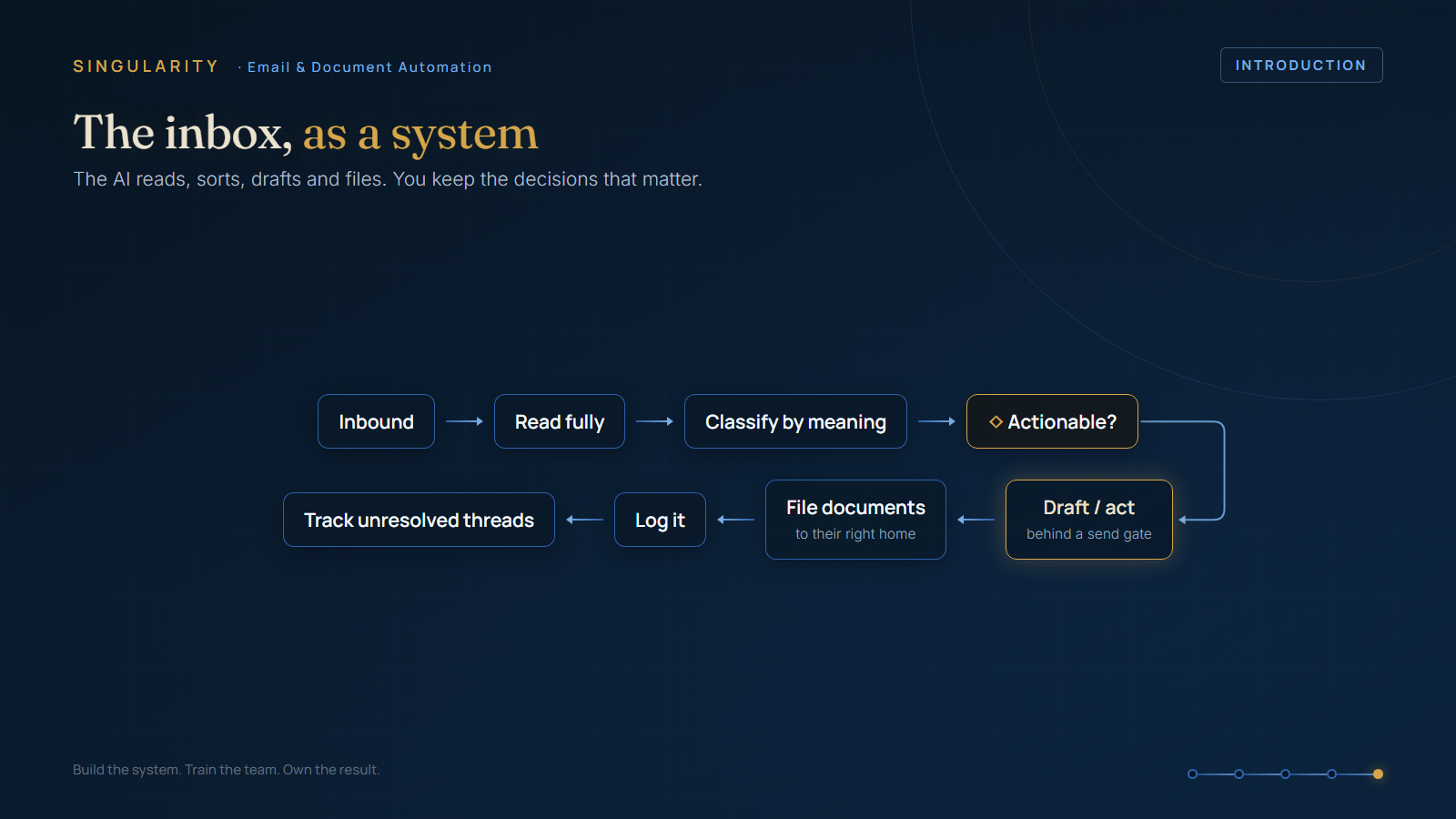
- Sorting every email by what it means (Module 1). This goes beyond the starter prompt. The agent sorts each email by what it means to the business - a quote, a tender, a complaint. It does not sort by keywords in the subject line. You build the full category list. You also build the rules for when the agent is not confident. Mail the agent cannot place goes to you - it asks, it never guesses. The technical name for this sorting is classification, and you will see that word on the diagrams.
- The quick check on a timer (Module 2). This is the watcher, built correctly. Every few minutes the agent takes a cheap look: "anything new for me?" A quiet look costs about $0.0003 - a thirtieth of a cent. You build the rules for when the agent steps up to the full job. You also build the written record. Every handled email gets its own entry there, so the agent never handles a message twice.
- The hold-for-your-go rule (Module 3). Draft freely, send safely. The agent can write replies all day. But anything that goes outside the business stops and waits for your approval. You set who is trusted for automatic replies. You set what gets copied where. You set the flag-first habit for everything external. The diagrams call this checkpoint the send gate.
- Document filing and routing (Module 4). Attachments are documents with destinations. The filing rules read from one official register of where everything lives. With one register, two versions never disagree - the course calls that register the SSOT. You also get the hard lesson about a folder called "Processed", applied to every document type. The filing rules keep working even after someone reorganises the folders.
🧭 Context (where this goes: Eden Core)
The full version of this pipeline already runs on Eden Core, our structured business platform. There, an incoming email becomes a card on a pipeline board. The card links to the right contact, with a note of everything the automation did. In this course you build the same pipeline with rules and folders. The platform runs it with records and events. Course members see that version as it matures. Everything you learn here carries straight over.
✅ What good looks like (one promise)
Hours back every week. Replies already drafted and waiting, instead of a blank screen. And a written answer to "did we ever respond to that?" for every email the business receives.
Next: Module 01, Triage: Sorting Every Email by What It Means.