🎯 Overview
Your inbox gives you work all day, and you never chose that job. Tenders, supplier quotes, price changes, RFIs, variations, and the occasional complaint all land in one place. Most of them need a decision. Miss the wrong email, and it costs real money.
Here is what you build in this course. You build one small AI helper that watches your email all day. It works out what each message is. It drafts the routine replies. It never sends anything risky without your approval. You will hear two words a lot, so we define them now. An agent is an AI worker that follows your written rules and uses your files. Think of it as a very fast worker who does exactly what the paperwork says. A skill is a written method for one repeatable job, done the same way every time. It is like a work method statement, but for the agent.
So you build one skill, run by one agent. It is not a magic assistant. It is one reliable operator that does one job the same way every time.
By the end of the five lessons, that skill is written down and running. It takes about 90 minutes over a weekend.
📌 The rule of this course: one reliable operator, doing one job, the same way every time.
🧠 Why it is built this way (why start here)
Most people try to automate everything at once. They end up with a complex system they cannot trust. We do the opposite. We pick the single most repetitive part of your day: the inbox. We build one skill for it properly. You get one clear result by Monday.
This is also the honest version of AI. The reading and the drafting are the easy part. The hard part is what makes it safe to run in a real business. That hard part is the written rules for how work gets done and who can change the rules. The rules say what the agent may do on its own, and where it must stop and ask you. That rule-set is called governance, and governance is what you learn to build. A "governed" skill is a skill with governance around it: the method is written down, and so are the limits.
🔧 How it works: the shape of the skill
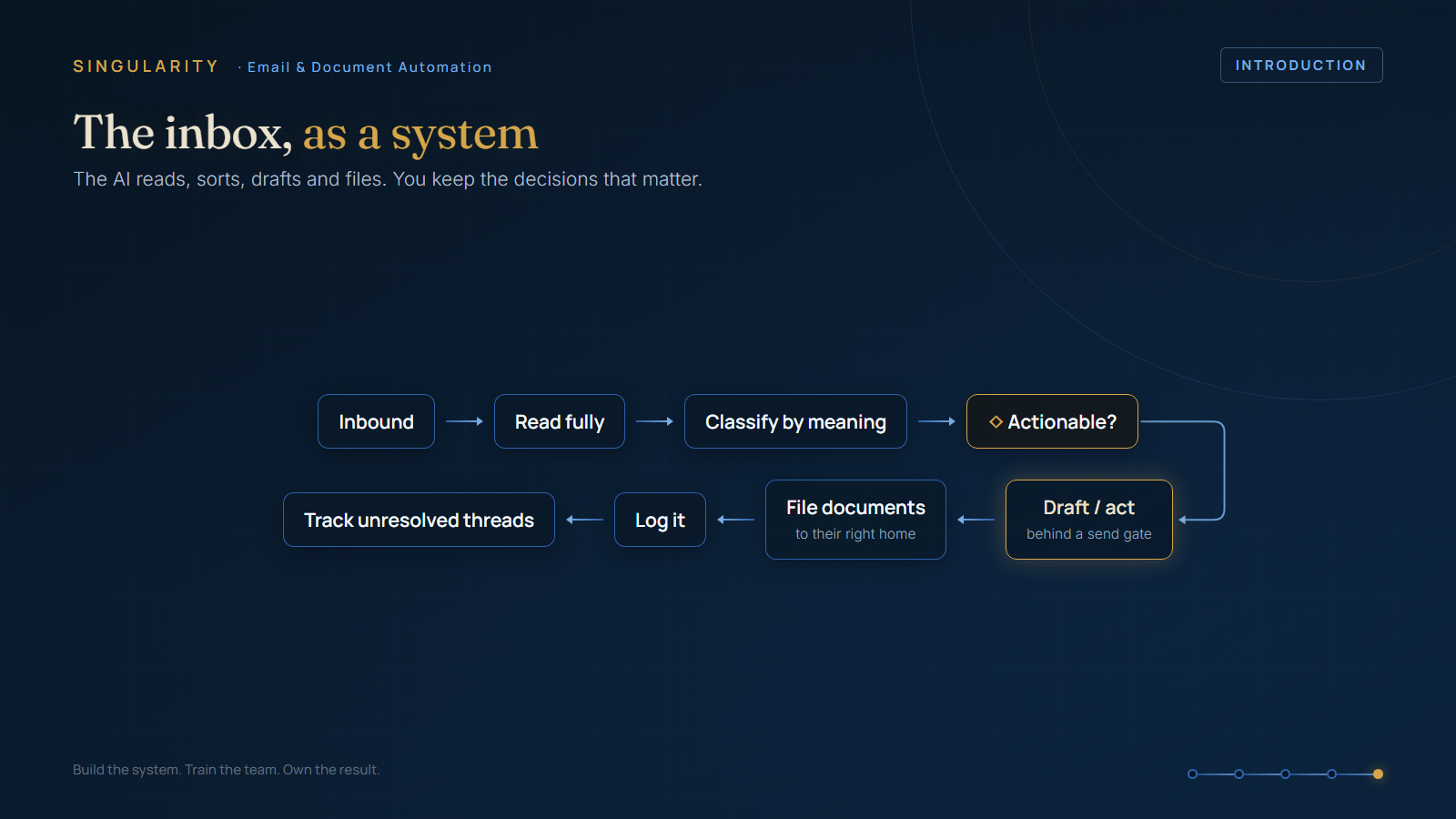
The skill has four moves. Each of the next four lessons builds one:
- Sort it. Read each message fully, with the attachments. Decide what the message means to your business. On the diagrams, this sorting step is called triage. A hospital does the same thing at the front desk: decide what each arrival is and what it needs.
- Watch cheaply. Check for new mail all day without a large cost.
- Draft and gate. Write the reply. Send the safe internal replies automatically. Hold anything that could commit the business.
- Package it. Write the whole method down as a reusable skill, so it runs the same way every time.
✅ What good looks like (by the end of this lesson)
You can say, in one sentence, what you are building: a skill with written rules that reads my email, sorts it by what it means to my business, drafts replies, and stops for me before it sends anything that matters.
That is the target. In the next lesson, we build the first move: the sort.
Next: Lesson 02, Read the Whole Thing: Sort Email by What It Means.