🎯 Overview
The Betty Blueprint is free, and worth reading before this course. It gives you Part 3: how to run the system on your own computer. It gives you the small rules folder that every tender carries. This is its governance folder. Governance means the written rules for how work gets done, and who can change those rules.
The Blueprint also gives you the W1 to W6 lifecycle: the six stages every tender moves through. It gives you the two filing stories that built the rules. If you only wanted the shape, you already have it.
This course exists because a tender is not one large rush of work. A tender is a job that moves through the same stages every time. A request comes in at one end. Out of the other end comes one of two results: a written no-bid decision, or a submitted proposal tracked to won or lost. We call this flow the pipeline. You will see that word on the diagrams.
Most businesses run their tenders on stress and spreadsheets. The cost is more than stress: missed deadlines, rushed margins, and no record of why you lost. The Blueprint gives you the folders. This course gives you the working pipeline. An agent - an AI worker that follows your written rules and uses your files - does the follow-up work.
💬 Paul has said on camera what the live version saves: 30 to 40 hours on a bigger tender. Follow-up on information takes most of that time. That number is what this course is for.
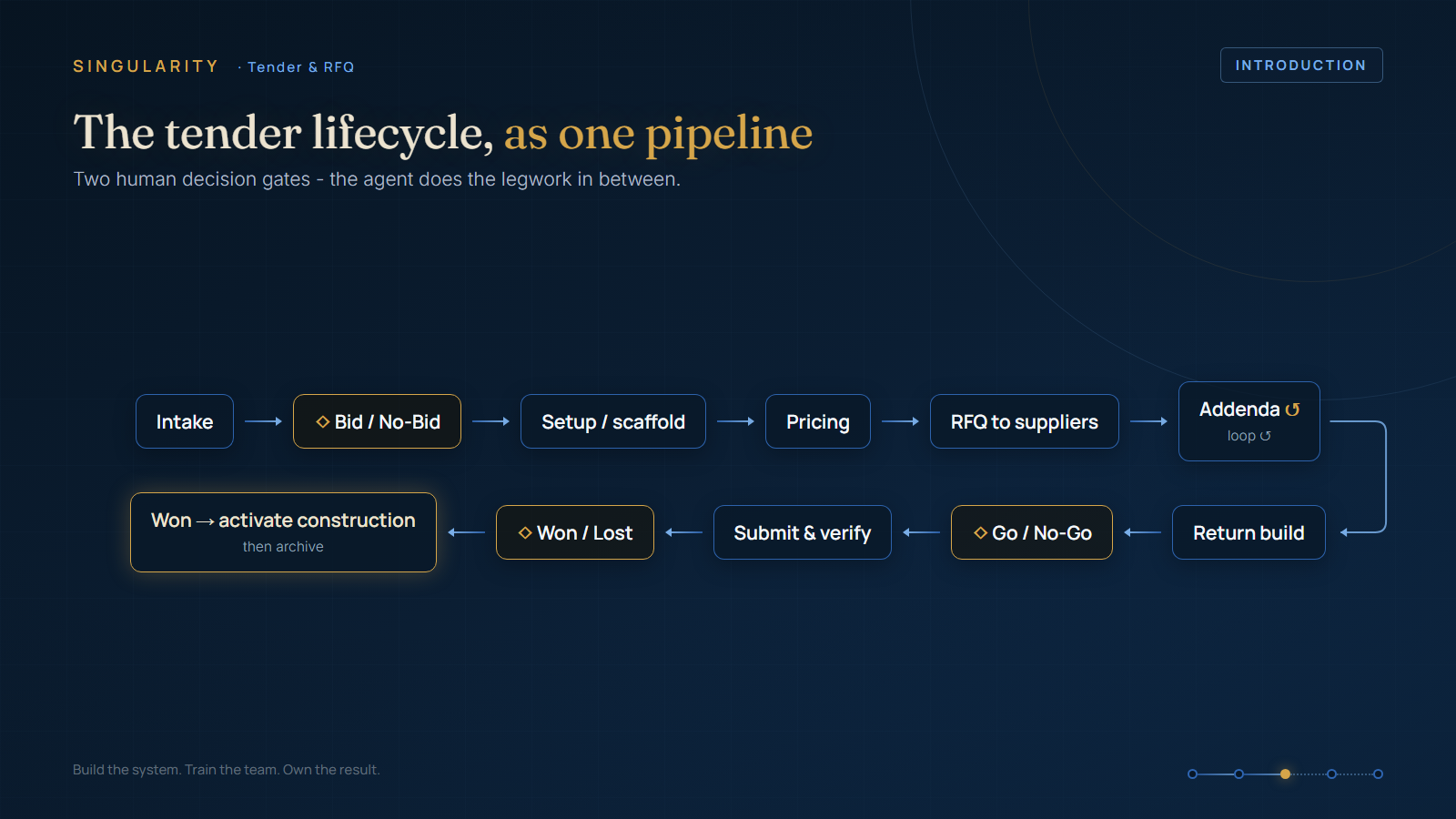
📌 The rule of this course: a tender is a pipeline, not an event.
🧭 Context (what this course adds to the free build)
- Intake and the bid or no-bid gate (Module 1). The Blueprint shows where tenders land. This module builds the gate that decides if a tender deserves your week. The gate uses scoring questions that the agent asks before a human spends an hour on the tender.
- Scaffold and pricing (Module 2). This module takes you from the Blueprint's template folder to a live tender workspace. The standard folder set appears automatically. The internal costing runs at the same time as intake. When new information lands, the agent makes the price estimate again as a new version. The old version stays on file.
- The RFQ loop (Module 3). This part has no free version. The agent reads the tender items and checks your supplier list. It drafts the full set of RFQs. It then tracks what came back and what needs follow-up.
- Return, submit, outcome (Module 4). This module keeps addenda under control during deadline pressure. It gives you a warning days before the deadline. It covers submission. It also covers the step almost nobody does: you learn from wins and losses in a register, and the next tender reads that register.
⚠️ A human signs off on everything that leaves the business. That rule is not negotiable. The course shows exactly where the sign-off gates sit.
🧩 How it fits together: Eden Core
The live system already runs tenders as a board in Eden Core, our online business platform. Every tender is a card. The system writes down every stage change. It links every document to its tender.
The folders and registers you build in this course map directly onto that board. Course members see the platform version as it matures. You do not need to rebuild anything to get there.
✅ What good looks like (one promise)
By the end you will bid for more work in less time. You will have a written record of every decision. Your tender folder will never again depend on the person who remembers where the addendum went.
Start with Module 01: Intake and the bid or no-bid gate.