Every Singularity course points back to this page. This is the real, working system the courses teach from. It is not a demo, and it is not a mock-up. When a module says "here is how BettyOS does it," this page is the source.
Every number and every mechanism comes from the live system's own written records. Those records are: the rules folder (the .management/ tree - the folder that holds the rules, not the work), the schedule of timed jobs, the security layer, and the library of written methods the agent works from.
Use this page as the shared evidence base. Then the examples stay consistent across every course.
🎯 What BettyOS is
BettyOS runs the back office of a commercial construction and pool-build business. It is an AI system, but it is not a chatbot attached to a folder. It is a properly organised business - folders, rules, owners, logs - with an AI worker attached to it.
The single most important idea in the whole system, and the one students most need to absorb, is this:
📌 The rules came first. The engine came second. The AI came third. The folders, the written rules, the owners, and the logbooks were all in place before any AI touched them. The AI was attached to that structure, not the other way around. A clever agent on top of a messy business only makes the mess faster. (In course language: governance first, runtime second, agent third.)
💰 The headline numbers (use these consistently)
The numbers, what they mean, and where each comes from:
- Tasks automated per day: 250+. Counted from the timer-driven jobs plus the on-demand work.
- Mailboxes monitored: 5 (paul@, tenders@, info@, melissa@, plus shared).
- Daily operating cost: ~$10. This is the AI usage bill after the check-cheap-first redesign described below. AI companies charge by the "token" - a unit like data on a phone plan.
- Governed skills: 38. Each skill is a written method for one repeatable job, done the same way every time (tender, construction, comms, governance).
- Scheduled cron jobs: 20. These are jobs the computer runs automatically on a timer, like alarm clocks. The technical name is a "cron job". The count comes from the engine's schedule file (Hermes's jobs.json).
- Human positions replaced: ~2. Admin plus coordination load.
- Cost of a silent poll tick: ~$0.0003 (~700 tokens). This is the cost of one quick "anything new for me?" look when the answer is no. It is a fraction of a cent.
The story behind the cost number: a real recorded cost audit found that three of those timed jobs consumed 62% of all spend. That finding drove the redesign: a quick cheap look first, and the full job only when there is real work. (This pattern is the "lean poller". You meet it properly below.) The redesign cut cost by roughly 58%. It is a recurring teaching example: measure cost by job, not by model.
🧩 The five-layer model (the spine of the Foundation course)
The whole system stacks in five layers, from bottom to top. In plain terms the layers are: the real work, the shared rules, the per-job rules, the glue that points AI tools at the rules, and the AI itself. On the diagrams the layers carry their course names: business roots, shared governance, local execution, bridge/wrapper (the pointer-file glue), and runtime (the engine and agent).
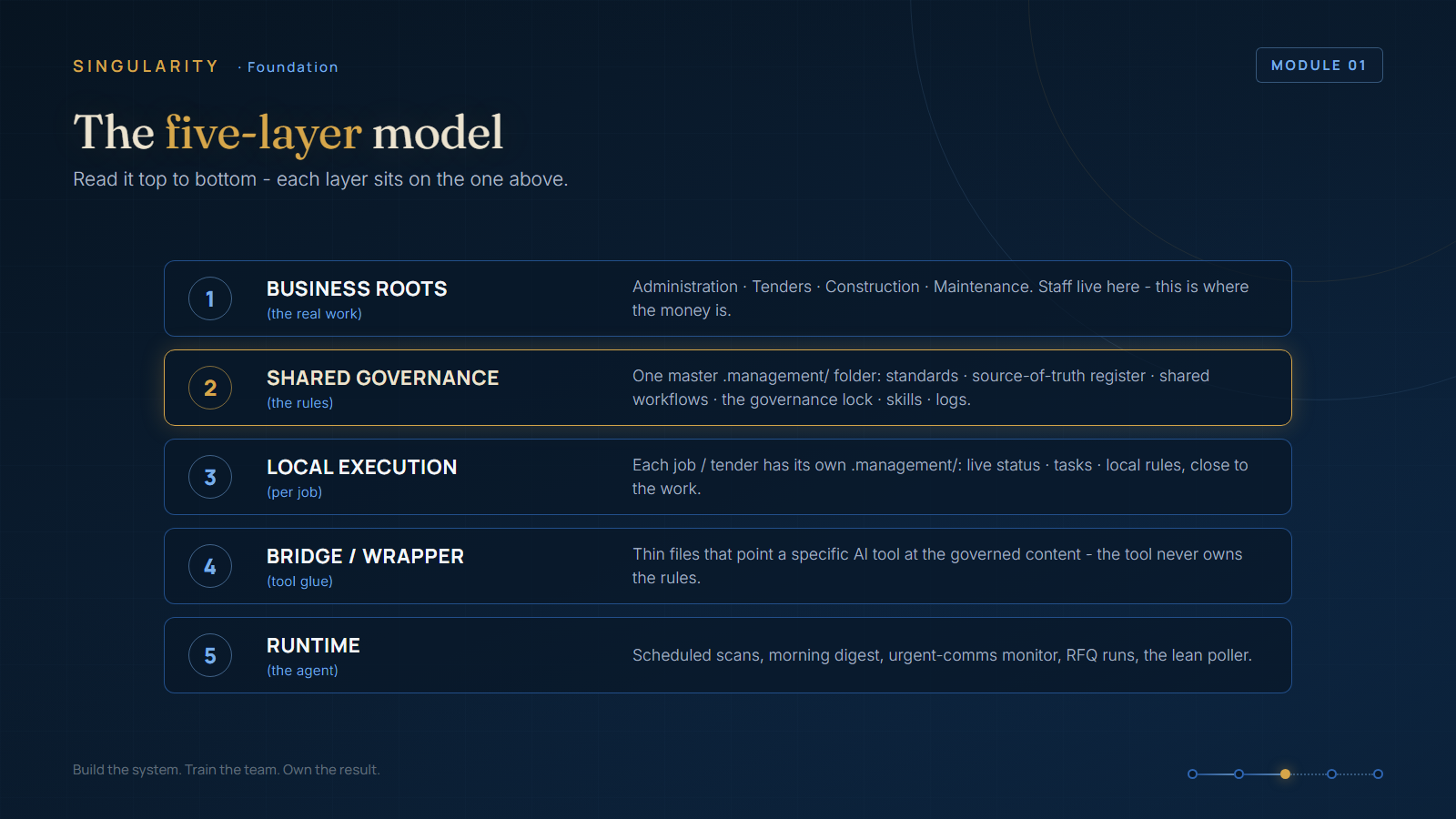
- Business roots. The real operating areas: Administration, Tenders, Construction, Maintenance. This is where the real work and the real money are. Staff still work in these folders every day. Nothing about their world changes.
- Shared governance layer. One master .management/ folder - the rules folder. It holds the standards, the shared ways of working, the skills library, and the logs. It also holds the register that names the official home for each subject. And it holds the locked list of things the agent may not touch.
- Local execution layer. Each tender and each construction job gets its own small .management/ folder. That folder holds live status, tasks, and any local rules. The rules stay close to the work, like a site office on each job.
- Bridge / wrapper layer. Thin pointer files (for example .github/copilot-instructions.md). Each one tells a specific AI tool where the real rules live. The tool can then find and follow the rules. The tool never becomes the owner of your business rules.
- Runtime monitoring layer. The agent itself and its timed jobs: scheduled scans, the morning digest, the urgent-comms watch, RFQ processing, the end-of-day summary, and the quick cheap look-in (the lean poller).
Why it matters for teaching: most people try to build layer 5 first - the agent - and skip layers 1 to 4. That is exactly why their agents are unreliable. The course order mirrors the build order: rules, then engine, then agent.
🔧 The control mechanisms (the governance course)
These controls keep the AI inside the rules:
- Governance Lock. A document that lists the state of each part of the system. Frozen parts cannot change without the owner's sign-off. Provisional parts are new and still settling in. Open parts follow normal rules. If a locked item changes without approval, that is a governance incident - written up and reviewed. This control stops the agent from changing an important item on its own.
- SSOT Register. A subject-by-subject ownership map. For every topic, one place is the official home, and everything else points there. This ends the problem of two copies of a document that slowly disagree.
- Skill-first routing. Before it improvises, the agent must match the request to an existing written method. Shorthand like "morning review" is an approved nickname for a governed method. It is not permission to invent a new process.
- Security Classification Layer. (due to the nature of the internet these days giving out security info is locked behind in the full course)
- Authority boundaries. Reading is broad. Sending and changing the system are tight. The agent may send email on its own only to an approved list of internal addresses. Anything external needs the owner's explicit instruction at that moment. The reason: an email can commit the business commercially.
- Logs as memory. The tools log is the logbook of everything changed. Status files and task boards record the current state. A structured, searchable record covers every email action - a well-kept register, not a pile of notes. The system has no memory between runs except what it writes down.
⏰ The daily rhythm (the Hermes Agent / cron course)
Everything below runs on a timer. The computer starts each job automatically on a schedule, like a row of alarm clocks. (The technical name for a job like this, and the name on the diagrams, is a "cron job".) One term before you read the timetable: when a quick check finds nothing to do, it reports [SILENT]. [SILENT] is the agent's way of saying "nothing to do, cost almost nothing, moving on."
A normal BettyOS business day, job by job:
- 06:00, Morning digest + root cleanup: where every job stands, what came in overnight (email and Teams, last 24 hours), who mentioned the business, and a folder-health check.
- 08:00 to 16:00, every 5 min, the Lean poller: the quick, cheap look - "any new '@Betty' work for me?" - and [SILENT] if there is none.
- 07:00 to 17:00, every 15 min, Urgent comms monitor: messages the owner directly, but only for genuinely time-critical items.
- 06:00 to 18:00, every 15 min, Orchestrator scan: the supervisor skill checks the locked list, the statuses, and the tasks across all areas. It also looks for drift - parts that slowly move away from the standard. It stays silent if nothing changed.
- 09:00 and 14:00, RFQ processing: the agent files supplier quotes and updates the registers.
- 17:00, End-of-day summary: what happened across tenders, construction, and comms.
The lean-poller pattern (taught in two courses): keep the cheap looking separate from the expensive doing. Every 5 minutes the agent takes a look of roughly 700 tokens: "anything new?" Then it stops. Only when it finds real work does it step up to the full, expensive run. More than 90% of those looks cost almost nothing.
📑 The tender lifecycle (the Tender & RFQ course)
A tender request moves through a governed pipeline, staged W1 to W6:
Intake, Bid/No-Bid, Setup (create the standard folder scaffold), Pricing, RFQs out to suppliers, Addenda (a loop - they keep arriving), Return build, Go/No-Go, Submit and verify, Won/Lost, then (Won) Construction activation, then Archive.
Real rules that came from real mistakes - strong teaching material:
- ⚠️ New Tenders/ is intake-only. Two tenders were once left sitting there, because someone mistook the folder for a workspace. The correction became a permanent written rule.
- ⚠️ Addenda must file to (E) Addenda & Clarifications/. Addenda were once lost into a generic "processed" folder. The cause: a general rule of thumb inside the AI tool outranked the local business rule. The fix made the business rule the owner and the AI tool the follower.
🏗️ The construction / handover flow (the Construction bundle)
Award, Activate project, WHS setup, Procurement and document control, Plant and equipment doc control, Variations (a loop), QA delivery, Practical completion, Handover (final O&M manual), then optionally retire the job to Maintenance.
The deliverable that closes a job is the O&M manual. It is assembled from warranties, datasheets, commissioning records, as-builts, and QA closeout evidence. That evidence is collected during delivery, not gathered in a rush at the end. That "collect as you go" discipline is itself a teachable system.
💡 The three durable lessons (repeat these everywhere)
- Build the rules before the agent. Build a reliable way of operating first. Attach the AI second.
- Turn mistakes into rules. The strongest parts of BettyOS came from logged failures, not clever ideas. Keep the mistake reports. Convert each one into a plain written rule.
- Keep humans on the decisions that matter. Read broadly, commit narrowly. The agent surfaces and drafts. The human authorises anything that commits the business.
🗺️ Visuals
The system has a live, clickable process map. It shows the end-to-end flow from enquiry to handover. It has drill-downs for tender, construction, communications, governance, and the daily timed jobs. Point at this map in lessons instead of redrawing it. See the System Diagrams resource in this section.