This page explains every term used across the Singularity courses. Each entry gives the plain words first and the technical name second. When a term appears on a diagram or in a later lesson, you already own it.
One picture anchors the whole page: the system is built in five layers. The real work sits at the bottom. The written rules sit in the middle. The AI sits at the top. Every term below lives at one of those layers, and the picture shows you where.
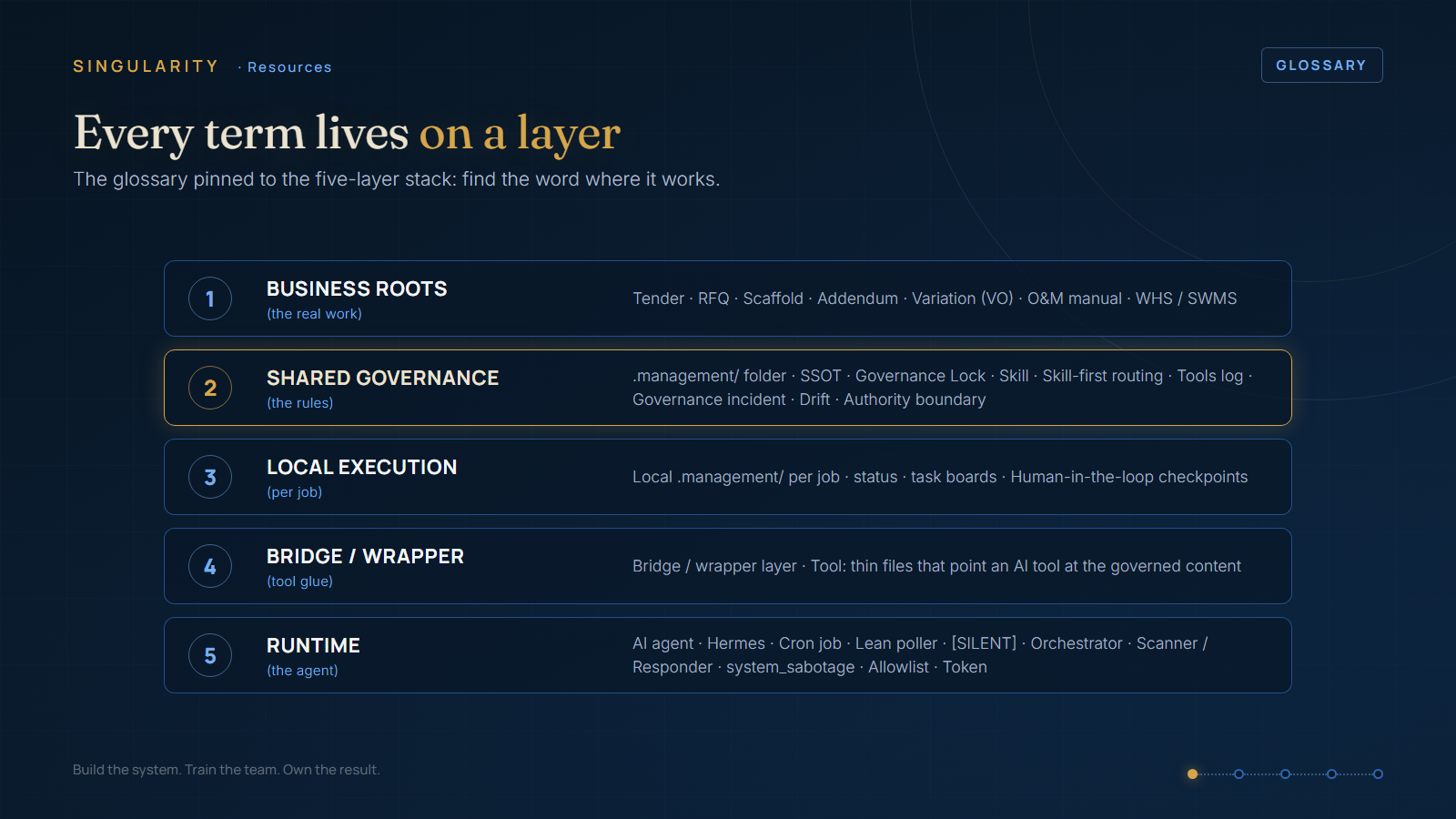
- AI agent: an AI worker that follows your written rules and uses your files. It can read, think, and take actions inside a job. It is not magic. Think of a keen new admin worker who does exactly what the procedures say.
- BettyOS: the real, working system the courses teach from. It runs the back office of a construction business, right now, every day. When a lesson says "here is how Betty does it", this system is what it means.
- Hermes: the engine - the program that runs the agent day to day. It loads the agent's written methods. It gives the agent its tools. It starts the jobs that run on a timer. (The technical word for an engine like this is a "runtime.")
- Skill: a written method for one repeatable job, done the same way every time. Think of the laminated procedure sheet on the workshop wall. Example: "process a new tender." The agent matches work to a written method instead of inventing a new approach each time.
- Tool: one single action the agent can do: read a file, search, send an email, run a script. Skills combine tools in order, the way a procedure combines steps.
- Cron job: a job on a timer - the computer runs it automatically on a schedule, like an alarm clock (every 5 minutes, or every morning at 6am). "Cron job" is the technical name you see on the diagrams.
- Lean poller: a quick, cheap look on a timer: "anything new for me?" If there is nothing, it stops, for a fraction of a cent. If there is something, only then does it start the full, expensive job. This is the number-one method for keeping the running cost down.
- .management/ folder: the folder that holds the rules, not the work. This one folder holds the written rules, the status board, the task list, the standard ways of working, and the logbook. It stays separate from the folders your staff use every day. It is the agent's site office.
- SSOT (Single Source of Truth): one official home for each piece of information. Then there are never two different versions of the same fact. A register lists which document owns which subject, and everything else points there.
- Governance Lock: the short list of things the agent is never allowed to change on its own. It works like a "do not operate" tag on the switchboard. Locked items need the owner's sign-off before anyone touches them.
- Governance incident: when an item on that locked list changes without approval. The incident is written up and reviewed. Treat it like a safety incident, not a small matter.
- Drift: when the real thing slowly moves away from how it is supposed to be. Example: a folder tree stops matching the standard, one small shortcut at a time. The system watches for drift and catches it before it becomes a problem.
- Orchestrator: the supervisor - the skill that decides which other skills run, and in what order. It writes the summary at the end. Think of a shift supervisor, not an extra worker.
- Skill-first routing: the rule that the agent must use an existing written method when one exists for the job. It must not invent a new process on the spot.
- Security Classification Layer: the front gate that screens incoming messages. (due to the nature of the internet these days giving out security info is locked behind in the full course)
- system_sabotage: the formal name for one specific type of attack on the system. (due to the nature of the internet these days giving out security info is locked behind in the full course)
- Authority boundary: the line between two groups of actions. The agent may do the first group on its own: read widely, and email your own staff. The second group needs a human's sign-off first: email anyone outside the business, or change the system itself.
- Allowlist: the approved list - the internal email addresses the agent may write to without asking. Anyone not on the list counts as external. External addresses need your explicit approval every time.
- Human-in-the-loop: a checkpoint where a person reviews and approves before the system commits to anything that matters. It is the same idea as a sign-off before the pour.
- Tools log: the logbook - a running written record of each change: what the agent (or a script) changed, when, why, and the outcome. Entries are only ever added, never edited. It is the system's memory, and the record you can go back and check.
- Tender: a formal bid to win a construction job. You know this one. It is here because the courses track a tender through six stages, W1 to W6, from the day it lands to the day you hear won or lost.
- RFQ (Request for Quote): a request sent to suppliers or subbies. It asks them to price a scope of work. You know this one too.
- Scaffold: the standard folder-and-file structure created for every new tender or job. Every job then starts in the same known shape. It is the same idea as scaffold on site: standard, safe, and up before the real work starts.
- Addendum: a mid-tender change or clarification issued by the client. You must price it and include it in the bid. If you lose one, you have priced the wrong job.
- O&M manual: the Operations & Maintenance manual - the handover pack that closes out a construction job (warranties, datasheets, as-builts, commissioning records, QA).
- WHS / SWMS: Work Health & Safety / Safe Work Method Statement - the site safety paperwork.
- Variation (VO): a priced change to an awarded construction job. Each one is tracked as a numbered record (VO-01, VO-02, and so on).
- Token: the unit AI companies charge by - think of it like data on a phone plan. "Cost by job" means you track which jobs use the most tokens.
- [SILENT]: the agent's way of saying "nothing to do, cost almost nothing, moving on." The quick timed check reports [SILENT] when there is nothing new: no log entry, no noise, almost no cost.
- Bridge / wrapper layer: small pointer files that tell a specific AI tool where your real rules live. The tool then follows your rules instead of becoming the owner of them.